Spent going backwards
A large share of ordinary reading time is regression — the eye jumping back to a word it already passed, because comprehension never quite closed.
Every reading tool starts with what it does — words per minute. We start with why anyone opens a page at all. Meaning isn't what you trade away for speed. It's what carries you.
Words are a delivery mechanism. Nobody finishes a page and remembers letterforms. They remember a picture that assembled itself in their head — a river, a decision, an argument that finally landed. Understanding is the product. Reading is the packaging.
Which is why the usual promise bothers us. Read four times faster, it says, then quietly hopes you never test yourself afterwards. Strip out the pictures and you haven't made a faster reader. You've made a faster skimmer with a worse memory.
So we started from the other end. We asked what has to stay true no matter how fast the words move — and the answer was the picture. So we built the picture in.
Speed without comprehension is just scrolling.
The line we build against
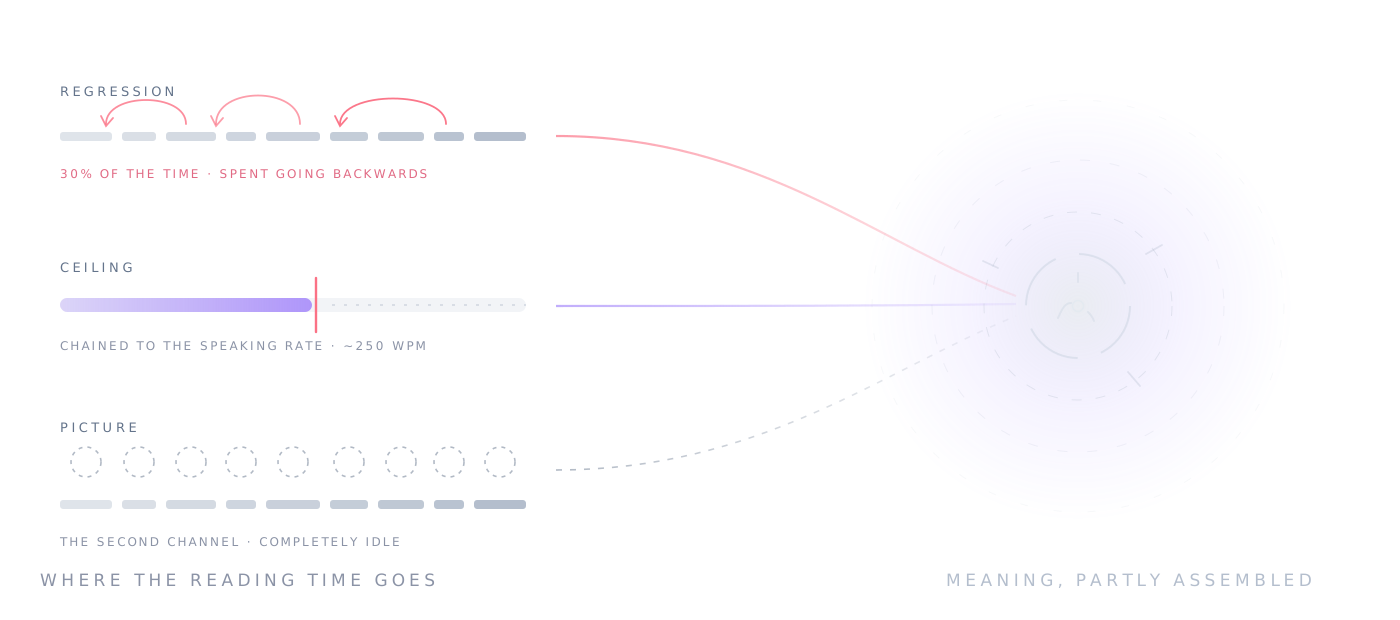
A large share of ordinary reading time is regression — the eye jumping back to a word it already passed, because comprehension never quite closed.
Silently pronouncing each word chains your reading rate to your speaking rate. It's a hard ceiling, and it sits far below what the eye can take in.
Conventional word-flashing removes the eye movement but gives nothing back. The channel that handles imagery sits completely idle while you race.
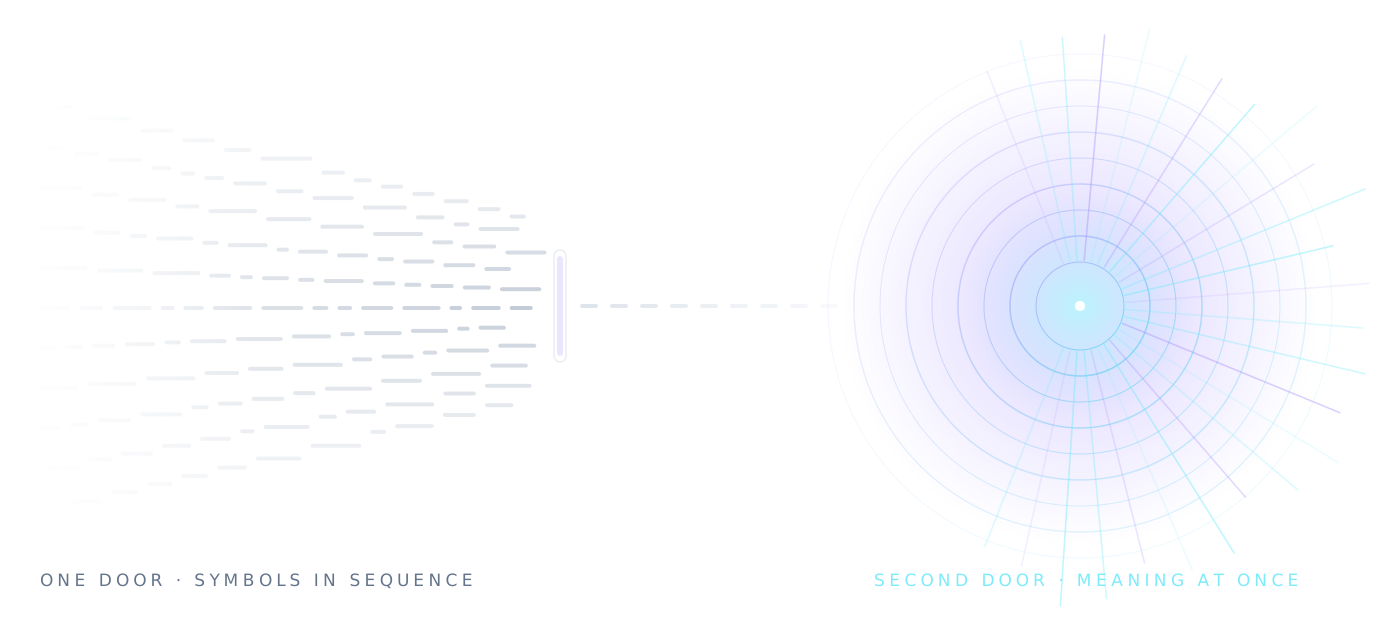
Language arrives through one narrow door: symbols, decoded in sequence, at the speed your inner voice permits. Pictures don't wait in that queue. So we open the second door — and the picture is already there when the word lands.
A word isn't a key into a picture dictionary. Bank is two entirely different things and a lookup table can't tell you which. Every sense carries context cues, scored against an eight-word window either side — so the image you get is the one the sentence meant.
I sat on the grassy bank of the river.
I walked to the bank for a loan.
Rain drips. Fire flickers. Verbs of travel sweep across. Motion targets sub-elements, so only the raindrops fall while the cloud holds still.
An open-weight neural voice running entirely on your machine. It follows your pace, with the audio as master clock so drift can't accumulate.
Five resolvers tried in order: 528 marks drawn by hand at the core, morphology and compounding generating the rest, a 200,000-icon open pool restyled into one stroke language, and a procedural floor that cannot fail. Coverage isn't a statistic — it's a guarantee, and every image is labelled with the tier that produced it.
No server, no telemetry. You can sign in with Google if you want your documents kept separate from whoever else uses the browser — but the documents themselves are parsed on your own machine and stay there, which matters when the document is medical, legal or simply yours.
Finish a passage and the app asks what actually landed, mixing real targets with plausible distractors. The recall score sits next to your speed, so you can see exactly where going faster started costing you.
Dwell stretches for long words, commas, sentence ends, paragraph breaks and numerals — so the stream breathes the way the prose does instead of machine-gunning it at you.
Print hands the brain a single stream — letterforms — and asks it to reconstruct everything else. The reader sends three: the word you see, the picture it means, and the voice that says it, locked to one clock so they land as a single moment rather than three events. Each stream travels a different route through the brain, so more of it is working on the same instant of meaning — and understanding stops depending on one fragile channel.
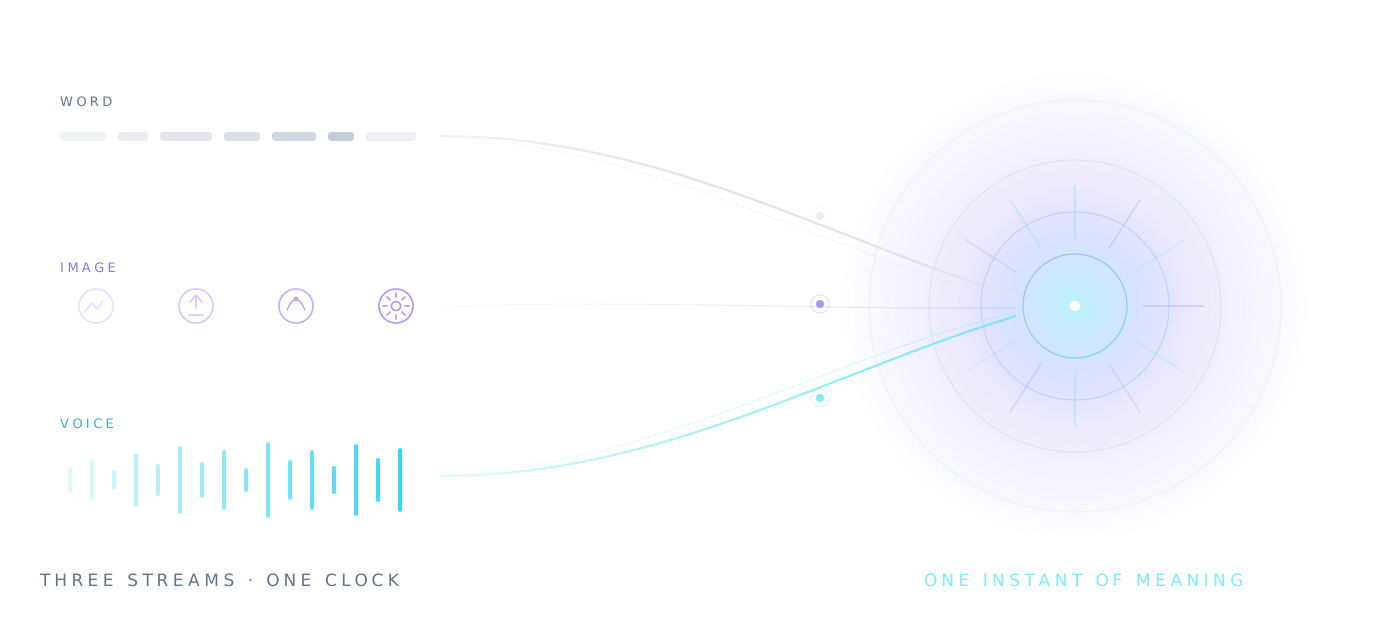
The printed form, one word at a fixed point. This is the stream ordinary reading already has — spelling decoded into language through the visual word form system. Alone, it's a bottleneck. Here it's one voice in a chord.
An image chosen by sense, not spelling, engaging the visual-semantic system that letterforms leave idle. This is dual coding — the old, well-tested finding that a thing stored as word and picture leaves two memory traces, and is recalled better than either alone.
A neural voice pronounces the word in the same instant it appears, opening the auditory and phonological route. Seeing and hearing a word arrive together, on the same clock, reinforce each other in a way that either alone cannot.
Three representations of one meaning, in the same moment. When they agree, encoding is richer and recall is stronger; when one stream stumbles — a rare word, a tired eye — the other two carry it. That's the whole design. And because any of this is easy to claim and harder to prove, the recall check is built in, so you can watch the numbers on your own reading rather than take ours.
Read the scienceEverything below is a consequence of the belief, not a feature list assembled backwards. Start with the resolver — it's the promise that has to hold for every word, including the ones nobody anticipated.
Hundreds of thousands of words resolve to a picture, and the reason that number had to be so large is the reader it was built for. A picture dictionary that covers the common ninety per cent fails exactly where a dyslexic or cognitively fatigued reader needs it most — on the unfamiliar noun carrying the sentence. Partial coverage drops you back into the spelling. So there is no partial coverage.
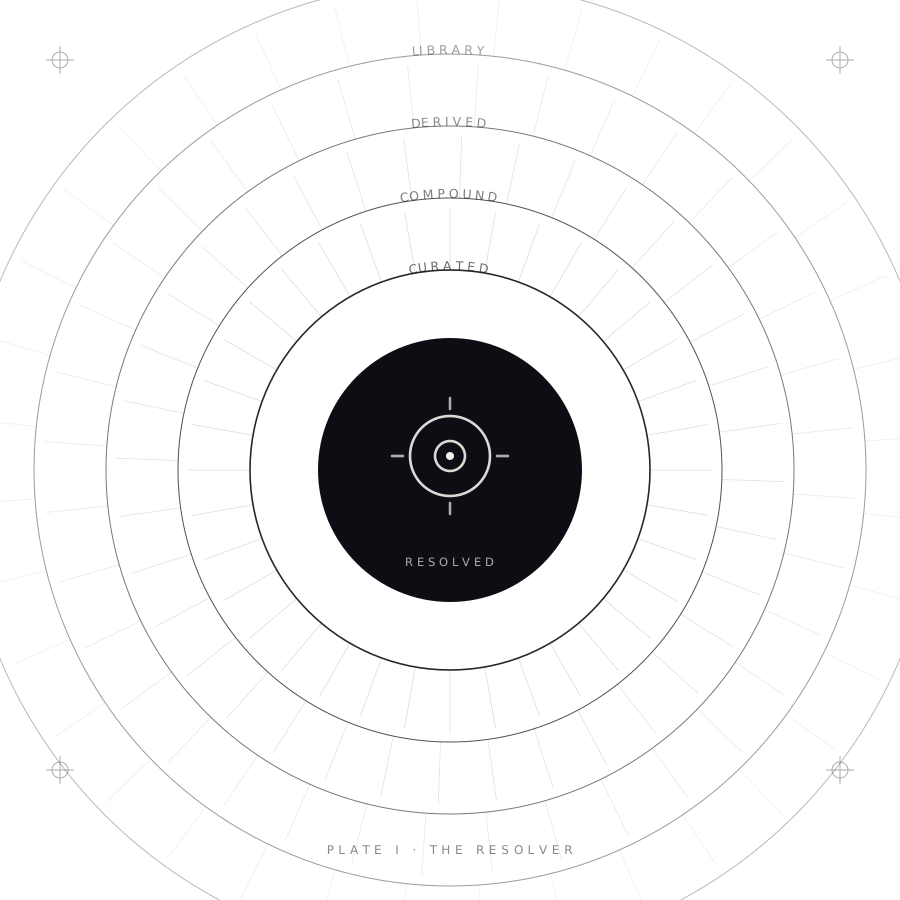
Hand-drawn and sense-disambiguated, covering the high-frequency core where the payoff is largest. Fully offline.
Unknown words split into known parts. riverbank becomes river + bank — and each half disambiguates the other, so you get the right bank.
Morphology as overlays: agent, negation, plural, tense, intensity, possibility, repetition. hopeless is hope carrying a negation mark.
Open-source icon sets restyled into this project's stroke language, normalised, animated by the same grammar, cached permanently after one fetch.
A deterministic mark derived from the word itself. borborygmus draws the same shape on every machine, forever, with nothing stored.
Not for people who want a number to brag about. For people with more to read than time to read it, and consequences attached to whether they understood it. That turns out to be a great many people, and their reasons aren't the same.
A reading list that outgrew the term. Get through the set texts with the meaning intact, then find out what actually stuck before the exam does it for you.
Discovery, contracts, case law, bundles by the thousand-page. Volume is the job. Missing a clause because you were skimming isn't an option.
Guidelines that change, journals that never stop, notes between patients. Dense terminology resolves to a picture rather than a sound.
Literature reviews where triage is the work. Move through abstracts fast enough to decide what deserves a proper, slow, careful read.
Filings, transcripts, memos, diligence rooms. The edge is usually in the part everybody else skipped — and skipping is what happens when speed fights understanding.
Specs, RFCs, design docs, review threads. Import the document and read it in one pass instead of scrolling it three times looking for the paragraph that mattered.
Board packs, strategy decks, investor updates, the inbox. Your job is to arrive already knowing, and there's rarely a version of the week with more hours in it.
Source documents, transcripts, submissions, drafts on deadline. Read the whole pile rather than the first two pages of each.
Reading in a second language means translating before you understand. Pairing each word with its sense builds the link directly, without routing through your first language.
One word, one fixed point, nothing crowding it. No line to track and no place to lose. More on this below — including what we won't claim.
Vocabulary paired with imagery, sense by sense, with a comprehension check built in. Add your own words, images, or a lexicon for the subject you teach.
The shelf you genuinely intend to read. The saved articles. The manual you should have read first. Reading was never the obstacle — finding the hours was.
Dyslexia is a difficulty with decoding, not with thinking. The meaning was never the problem; getting through the spelling to reach it was. Almost everything in this app happens to sit on that seam — not because we set out to build assistive software, but because removing the decoding bottleneck was the point from the beginning.
This is not a diagnosis, a therapy or a treatment, and we will never describe it as one. It's a way of presenting text that some readers find easier and others don't. It's free, it needs no account, and nothing about your reading leaves your device — so the only way to find out is to run a page of your own through it.
The word appears at one fixed point and stays there. No line to follow, no return sweep, no place in the paragraph to keep. Skipping a line becomes structurally impossible.
Neighbouring letters interfere with recognition, and that interference is often larger for dyslexic readers. Here there are no neighbours — one word, empty space on every side.
The paired image is chosen by sense, so understanding can arrive before decoding finishes. Set icon flashes, then word to prime meaning first, or icon replaces word for pure picture.
Run the voice alongside the stream and each word arrives through two channels locked to the same clock. Reading and being read to stop being separate activities.
Nothing here requires speed. Plenty of readers run it at 120–180 wpm, well below a normal rate, purely for the fixed point and the single word.
A dense wall of text is discouraging before a single word is read. A stream has no wall — just the next word, with the remaining time shown honestly so the end is always in sight.
Import the actual coursework, contract or chapter. Parsed on your machine, never uploaded.
Animation helps some readers and distracts others. One slider scales every animation at once, down to none — and a system reduced-motion setting silences all of it unasked.
Hundreds of thousands of words resolve to an image, because the words that strand a struggling reader are precisely the rare ones a smaller dictionary would miss. Five tiers, tried in order, ending in one that cannot fail — so the second channel is there for photosynthesis and indemnify, not just for dog.
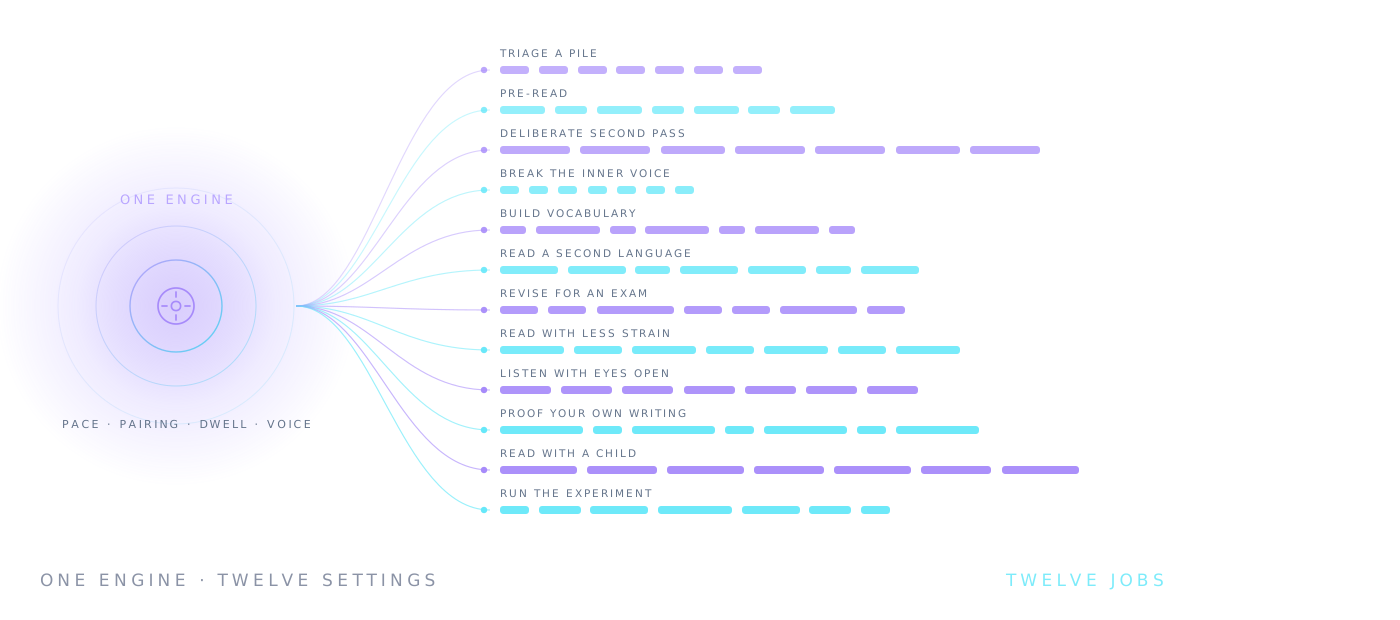
The same stream serves very different purposes depending on how you set it. Pick a job and we'll show you exactly where to start. Every setting here exists in the app today.
One search box over six free-book directories — Project Gutenberg, the Internet Archive, Open Library, Wikisource, OpenAlex and Standard Ebooks — where every title says plainly whether you can read it here or only find it. Forty-two complete books ship with the app and want no network at all. Pick one, pick a pace, and it opens in the reader; or hand it to the gym and drill on Dickens instead of on our house passages.
Reading slowly is usually four separate problems wearing one coat: the eyes land too often, take in too little per landing, keep jumping backwards, and wait for an inner voice that tops out around 250 words a minute. So we built six short drills that go at those four directly — no document to import, nothing to set up, ten minutes a session.
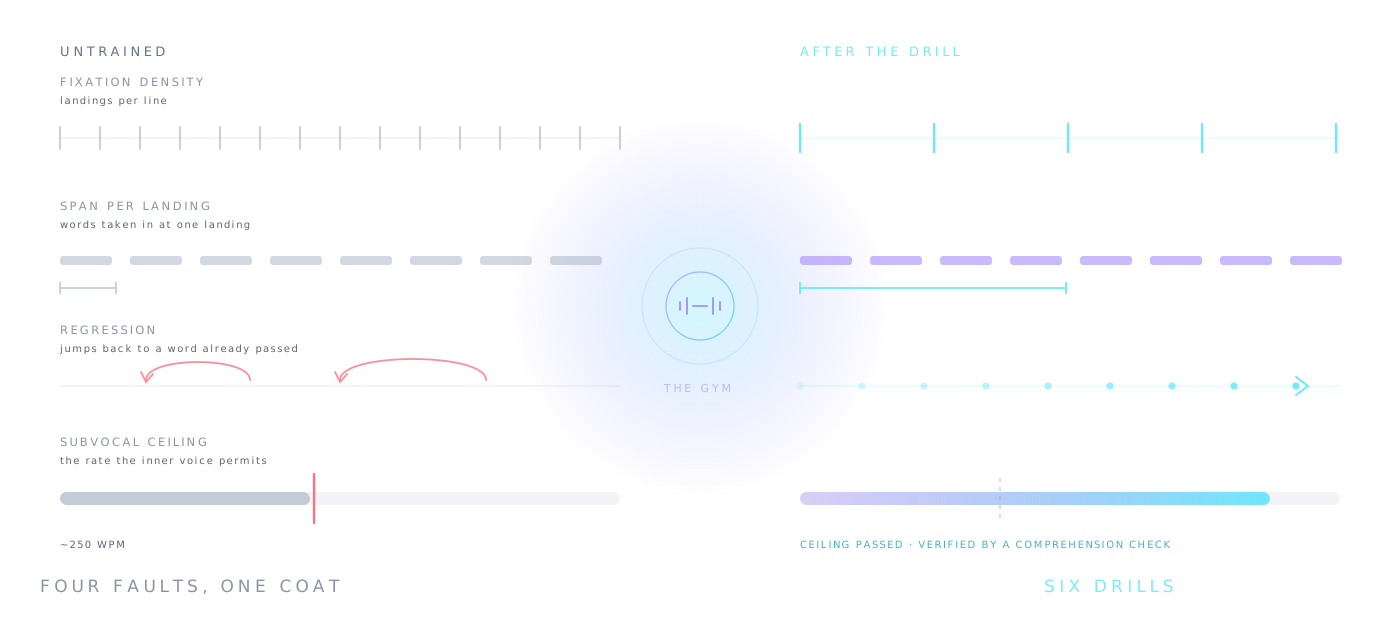
A grid of numbers found in order without moving your eyes off the centre. It stretches the useful field around a single fixation — the thing that decides how many words one landing can serve.
A phrase flashed too briefly for your eyes to move, then four near-identical options. The exposure adapts until it finds your real span instead of the one you'd have claimed.
Ordinary prose, paced line by line, with everything you pass fading out behind you. Regression is the biggest single cost in normal reading and the cheapest one to remove.
Pace climbs 25 wpm every twelve seconds until you say it broke — then a comprehension check decides whether it really had. Everything else is calibrated against that number.
Six drills, four comprehension checks, one verified ceiling. A pace only becomes a personal best when the check passed — because any speed is achievable if you stop caring what you understood.
Open the GymMost AI assistants answer you with a wall of text — the exact thing this app exists to fix. Reader AI answers inside the reader itself: ask anything, get the answer, then press Play and read it the way you read everything else here — icons, motion and voice, one meaning at a time. It runs on open-source Qwen, entirely in your browser. No API, no account, and nothing you ask ever leaves your device.
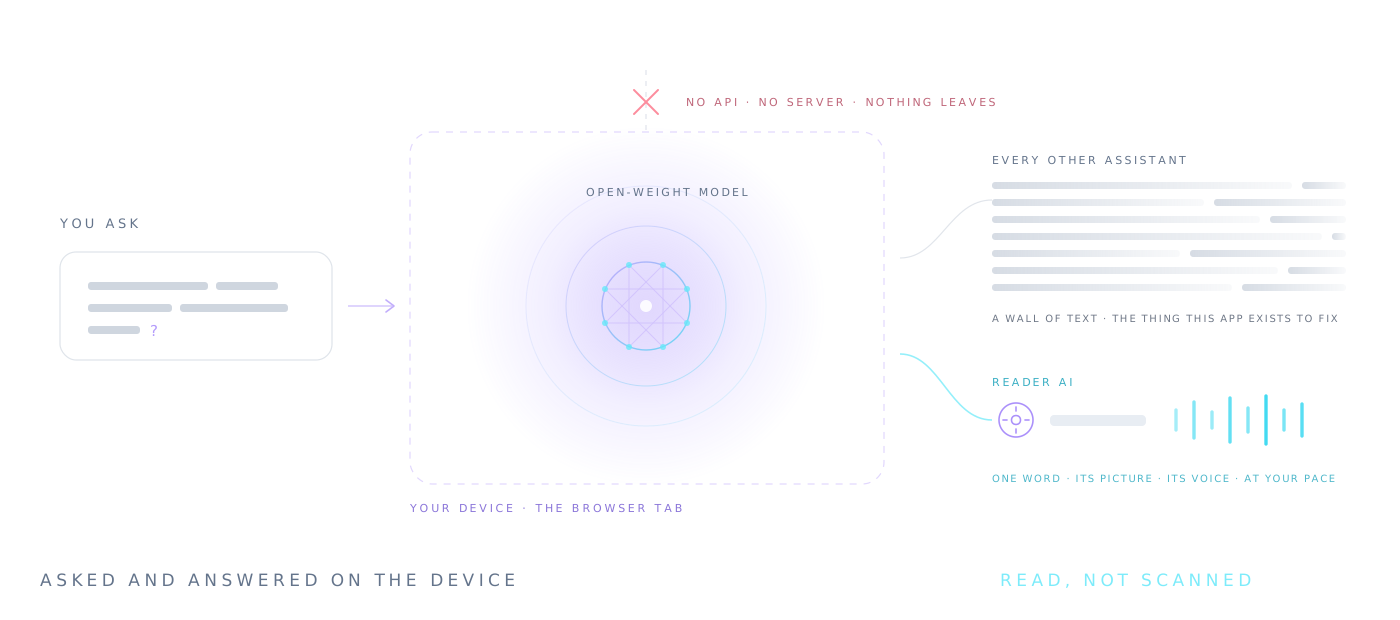
Every answer lands one tap from the reading engine. Instead of scanning a paragraph, you stream it at your trained pace — the answer arrives the way the app taught you to take in everything else.
For dyslexic and cognitively different readers, the hard part of an AI answer is the same as the hard part of any page: a dense block of crowded lines. Reader AI hands its answer to a presentation with no crowding at all — one word, one point, one voice.
Paste anything you're struggling with and ask for it shorter, simpler, or explained like you're new to it — then read the rewrite in the reader. A second draft of any text, on demand, at your level.
The model downloads once and runs in the browser tab. Your questions, your documents and the answers never touch a server — the same rule as the rest of the app, because there is no server.
An assistant that speaks your reading language. It lives beside the Library and your documents, and every word it writes can be read the accessible way — no copy-paste, no second app.
Open Reader AIFifty-one long-form pieces: how the reader actually works, how it stands against every other reading app and speed reader, where reading machines go next, and what reading tools are and aren't allowed to claim for dyslexic and cognitively different readers. Roughly seventy thousand words, free, nothing tracked.
Reader runs on Android XR — the headset platform Google built with Samsung and Qualcomm, on Galaxy XR today and the devices that follow it. Every other screen puts the word somewhere. A headset puts it at a point that finally, literally, does not move.
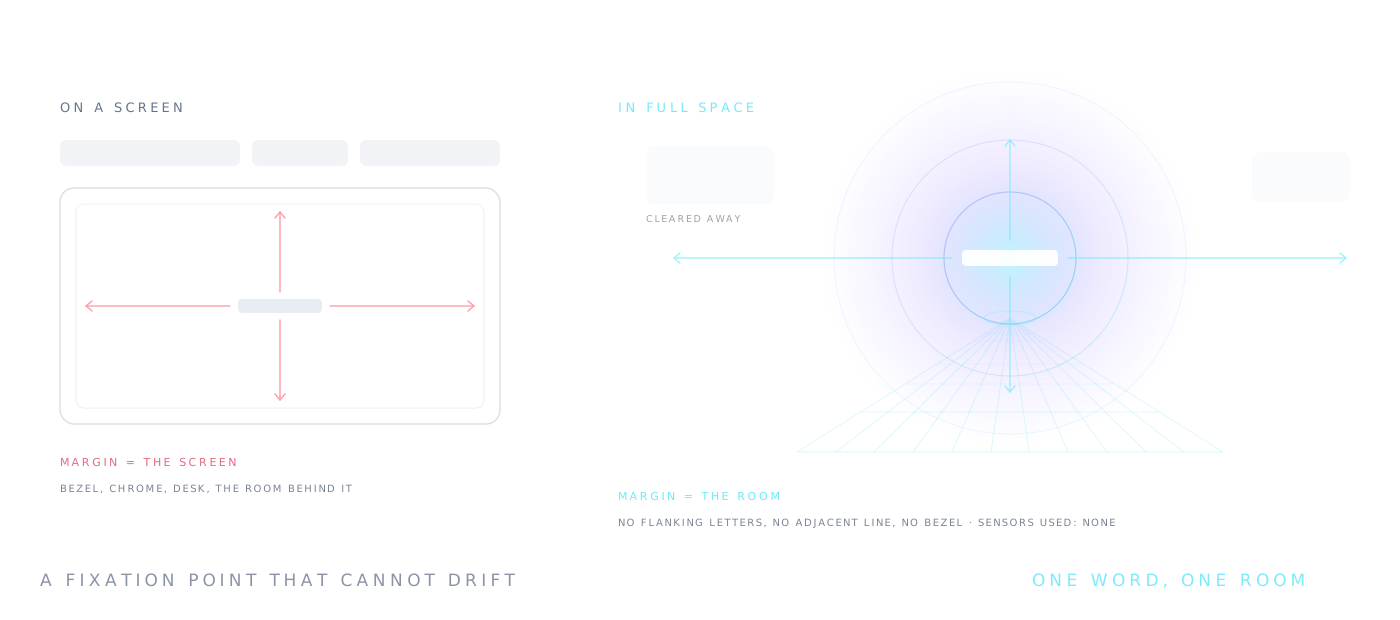
The whole technique rests on two things: a fixation point that stays put, and a word with no neighbours. On a monitor both are approximations — the screen has edges, a bezel, a desk behind it. In Full Space the approximation ends. One word, pinned where you put it, with a room's worth of empty field on every side.
That matters most to the readers the crowding research is about. A letter is harder to recognise when others sit close beside it, the effect is measurably larger for many dyslexic readers, and adding space around text has been shown to improve their reading speed and accuracy with no training at all. A headset takes that finding to its architectural limit — more margin than any page can offer, because the margin is the room.
Honesty, as always: this is a way of presenting text, not a therapy, and we don't claim it treats dyslexia or reduces its symptoms — no one has tested this presentation on dyslexic readers, in a headset or out of one. What we can promise is the presentation itself, and that finding out costs nothing. The evidence, honestly · what we will not claim.
On a phone the point moves because your hand does; on a desktop, because your posture does. Pinned in space, the word holds still even when you don't.
No flanking letters, no adjacent lines, no browser chrome, no desk. The nearest visual neighbour to the word is the wall of the room.
Ask for the room and every panel, notification and app clears away. Distraction isn't managed — it's simply not rendered.
The identical resolver, lexicon and motion grammar as the web, desktop and Android builds. Hundreds of thousands of words resolve to a picture here too.
No eye tracking, no camera, no gaze data. Nothing about your reading leaves the device.
The web app is the whole thing and always will be. Around it sit five wrappers and an extension, for the places a browser tab is the wrong shape — a desktop with a file menu, a phone with a share sheet, a headset with a room to pin the words to, a watch that was never too small for one word, and the web page you're already looking at.
Open a document from disk, read the clipboard with a keystroke, and run the whole thing with the network unplugged.
Get it for MacThe same build as an installer or a single portable .exe you can carry on a stick and run without touching the registry.
Get it for WindowsShare an article to it from any app and it opens straight into the stream. One word at a time is what a phone screen was always best at.
Get it for AndroidAsk for the room and everything else clears away, leaving one word pinned where you put it. The fixation point finally stops moving.
Get it for Android XRSend a passage across from your phone, then read with the crown under your finger. One word fills this screen instead of rattling round it.
Get it for your watchThe page you're already on, minus the furniture. It finds the article, discards the nav and the newsletter box, and streams what's left.
See how it readsNot six codebases pretending to agree. The resolver, the lexicon and the motion grammar are literally the same file in five of the six. The exception is the watch, which runs Kotlin instead of a browser and so runs a port — the pacing crossed over, the pictures could not. What differs everywhere else is only what each host will permit, and the table that lists every difference is on the apps page, watch column included.
The app is a single HTML file with no backend, and the free plan is the whole of it — every mode, every voice, every import — for up to 5,000 words a day through the reader. Teaching is free too: an instructor profile costs nothing, and it can register a whole class of free accounts in one paste. Membership removes the limit, and the first day of it is free. Custom software is a conversation, not a checkout.
The complete app, up to 5,000 words a day in the reader.
A teacher, tutor or adviser profile, and the tool that puts a whole class on free accounts at once.
No daily limit, and a record of whether any of this is working. Try it free for a day — cancel before it ends and pay nothing.
Purpose-built reading software, inside your walls, with the vocabulary your field actually uses. Billed by agreement — not by card.
Sign up as an instructor, paste your roster one student per line as
Name, email, give the group a name, and the page hands you a registration link for each
student and a pre-written email to send from your own address. They land on free accounts — the
complete reader, 5,000 words a day each — and turn up in that Student Group in your app, where you
can send a document to all of them at once. There is no minimum, no card, and no expiry: a class of
four and a year group of four hundred cost the same nothing. The roster is parsed in your browser
and never uploaded, which is the same promise the rest of the app makes.
Nobody has to convert, and a free class stays free for as long as you leave it alone. But a student who is reading past 5,000 words a day is telling you something, and at that point you can buy seats for the roster you already registered — the same names, the same group, one PayPal subscription, no re-registration. A seat is an annual membership at a volume price against the $240-a-year list, and it lifts the limit for that student only. Ten seats is the minimum; buy for the students who need it and leave the rest of the class on Free.
40% off. A resource room, a support group, one class.
50% off. A year group's accommodations, a department.
60% off. A whole cohort, a small school.
Seats are ordinary memberships bought in bulk, not custom software. They need no tenant, no subdomain and no contract — the students stay on this public app. If what you actually want is your own branded build with profiles set centrally and outcome reporting, that is the institutional page, and the pilot for it is free.
Price a rosterUniversities, colleges and schools get their own branded build — a web app on their own address, yourschool.readerinc.com, and desktop, Android and browser versions carrying the institution's name, mark and colours. Disability services set a student's reading settings once, and those settings arrive on every machine that student signs into, including the shared one in the library. Staff see that a student read and for how long. They never see what.
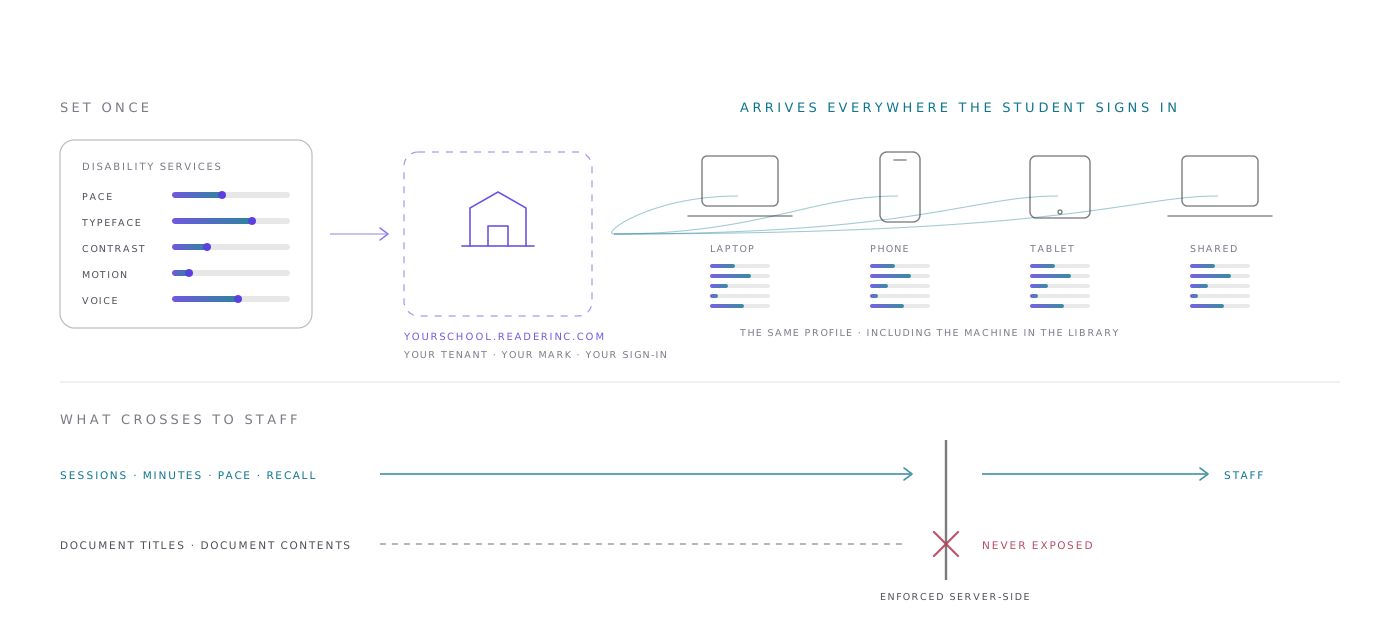
Your mark, your palette, single sign-on limited to the email domains you nominate. It re-skins itself from your tenant's settings, so there is nothing for IT to install or package.
Mac, Windows, Android and the Chrome extension, built with your name, icon and support route, and distributed through your own channels. Binaries are a build, not a setting — the page says what that involves.
Pace, typeface, contrast, motion, voice, pairing mode. An adviser sets the profile; the student stops re-configuring a tool in every room — and can still change anything.
Reporting carries sessions, minutes, pace and comprehension scores, exportable per student and per cohort. Document titles and contents are never exposed to staff, and the boundary is enforced server-side.
Teachers group students into classes, invite them by email, and send a document or a link to exactly the students they pick. It arrives in a School section of the student's app, sorted by class — and work can be handed back the other way.
We invented two customers and built their tenants out in full, end to end. A specialist K-12 school where every student is dyslexic, and a university access & diversity office carrying twenty-four hundred students — branded sign-in, profiles, a student's day, the staff console, the reporting. The institutions are fictional and say so; every screen and setting shown is real.
K-12 Special Needs Academy University access & diversityOne cohort, one term, no commitment. Unlike the free app, an institutional account does sync to your tenant — that is how the profile and the library follow a student to the next device, and we would rather say so here than in a footnote.
Read the institutional page Request a pilotOpen a passage you already know well and run it twice — once as plain text, once with the second channel open. Then answer the questions. The app tells you the truth either way.